
PLE 4.9.1 released
We are happy to announce the release of PLE version 4.9.1. This version is a minor release, improving a lot of existing features and fixing some bugs. For a detailed description of all that has changed, please see the online change log.
As always, we advise customers to upgrade to the latest version, even if no issues have been encountered using version 4.9.0.
Click here to download PLE Professional 4.9.1 right away.
The highlights of this new release are:
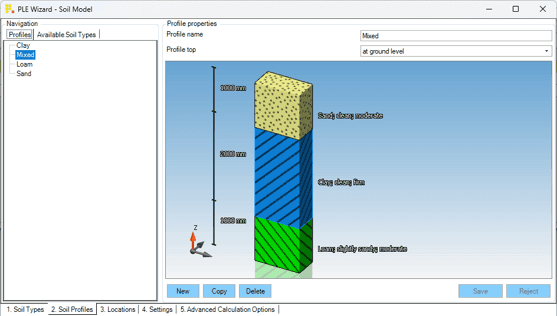
- Inclusion of the Profiles Editor into the Soil Wizard.
- Nodal data view in 3D Visualisation.
- Calculation updates due to new norm versions.
Inclusion of the Profile Editor into the Soil Wizard
When using the Soil Wizard, soil profiles are no longer defined in a separate pop-up window, but this step now takes place in the main wizard window. Therefore, all functionalities that were once spread over multiple windows are now consolidated into the main Soil Wizard window, making the workflow more streamlined and efficient.
Calculation updates due to new norm versions
The flexibility characteristics and stress intensification factors for tees calculations have been updated as newer versions of the applicable norms have become available. PLE now follows ASME B31-8:2025 and/or NEN-EN 13480-3:2024. A careful choice with each tee type has been made in those cases where the norms are unclear, incomplete, or differ from each other.
The calculations of Design Function 5 and Design Function 6.2 when selecting the ASME B31-8 option in the project properties (needs program module T8) have been updated. The hoop stress calculations now comply with the ASME B31-8:2025 norm.
Nodal data view in the 3D Visualisation
In the 3D Visualisation, an update has been made to the way nodal data is shown as colours on the pipeline. No longer are the elements coloured according to the nodal data value of its beginning. Instead the beginning and end of a pipeline element show the colour corresponding to the nodal data at that point.
If those two values/colours differ, a gradient over the element is shown. With nodal values next to "no value"-nodes, a gradient from or to grey is shown. This approach shows point loads much more clearly and also allows showing nodal values at the end of pipeline sections.

Axial buckling check
The results of the axial buckling calculations are now split out into three columns, improving the level of detail for the user. These changes may impact older projects with some warnings. Though these warnings are more accurate and the user will be provided with more data.

A reminder: dongle-less licensing is possible
We have updated the internal workings of our software to allow a different license type than the currently used hardware dongles. It is now possible to use the computer's hardware as the basis for licensing. Allowing usage of the program without a physical dongle, albeit having the license locked to that computer. This however means that moving the license to a different computer will not be possible without assistance from EDS.
Note that hardware dongles are still fully supported, and will remain supported. Please contact EDS for more information and if you are interested to change your licence from a dongle to a device-lock.
Courses for PLE users
As experienced PLE users know, the performance, accuracy, and speed of pipeline projects depend to a large extent on how well the project is modelled. A well-designed pipeline model can often have greater benefits than simply having a faster computer, and can prevent the need for extensive calculations on model variations.
To help users master the art of creating good, functional pipeline models, we are offering a half-day course. This course is designed for experienced users who want to refine their modelling skills and learn advanced techniques.
In addition to our experienced user course, we also offer training for new users as well as customized training for individuals or small groups. This training can be tailored to your specific needs and can address any particular challenges you may be facing. The combination of a course, and assistance with a project to be calculated is also possible.
For more detailed information, call +31 70 390 2386 or mail to [email protected].
PLE Feedback
We would love to hear your feedback on the new features and improvements of this version, or wishes for future capabilities or updates of existing functionality. Last October during the Dutch PLE Users Day we got some great ideas for new functionalities and features from feedback we got from the visitors, and we would like this information stream to continue.
So, if anything comes to mind, please contact [email protected].